ACTIVE PROTOTYPE · IN DEVELOPMENT

Mech CNC Mill

Machining skills before machine risk.

A generic three-axis CNC milling environment where learners set work zero, inspect G-code, verify safety, and watch material removal in XR or on desktop.

Adult learners using mixed reality beside a CNC mill
LIVE MACHINE SIMULATION
XYZ

GUIDED WORKFLOW

From setup to an evidence-based report

01

Place

Position the CNC in AR/XR or enter desktop mode.

02

Prepare

Choose stock, material, tools and machine pockets.

03

Calibrate

Jog X/Y/Z and confirm the G54 work zero.

04

Inspect

Load the external G-code and use the stock-envelope cube to verify the required material dimensions.

05

Machine

Run, pause and reset the cutting simulation.

06

Evaluate

Generate a score, findings and recommendations.

INTEGRATED TRAINING MODULES

One CNC learning environment. Five connected modules.

01SAFE

Safety & risk

Monitor alarms and safety conditions while the program runs, including collisions, clearance, spindle, feed, coolant and tool conditions.

02SET

Machine setup

Define stock and material, use the envelope cube to verify required stock dimensions, establish G54, assign T1–T15, create libraries and save the setup.

03MDI

G-code & MDI

Load an external G-code program, including confirmed .NC files, or create and edit a program in the MDI editor for execution in continuous or Single Block mode.

04STL

Virtual machining & STL

Run the three-axis material-removal simulation, inspect the machined result and export the part as STL.

05USD

Production cost

Estimate stock, consumed tooling, electricity, coolant, way lubrication and filtration from actual CNC program time and cutting conditions.

DIGITAL MACHINING LAB

A simulation built around real CNC decisions

X/Y/Z · DEPTH

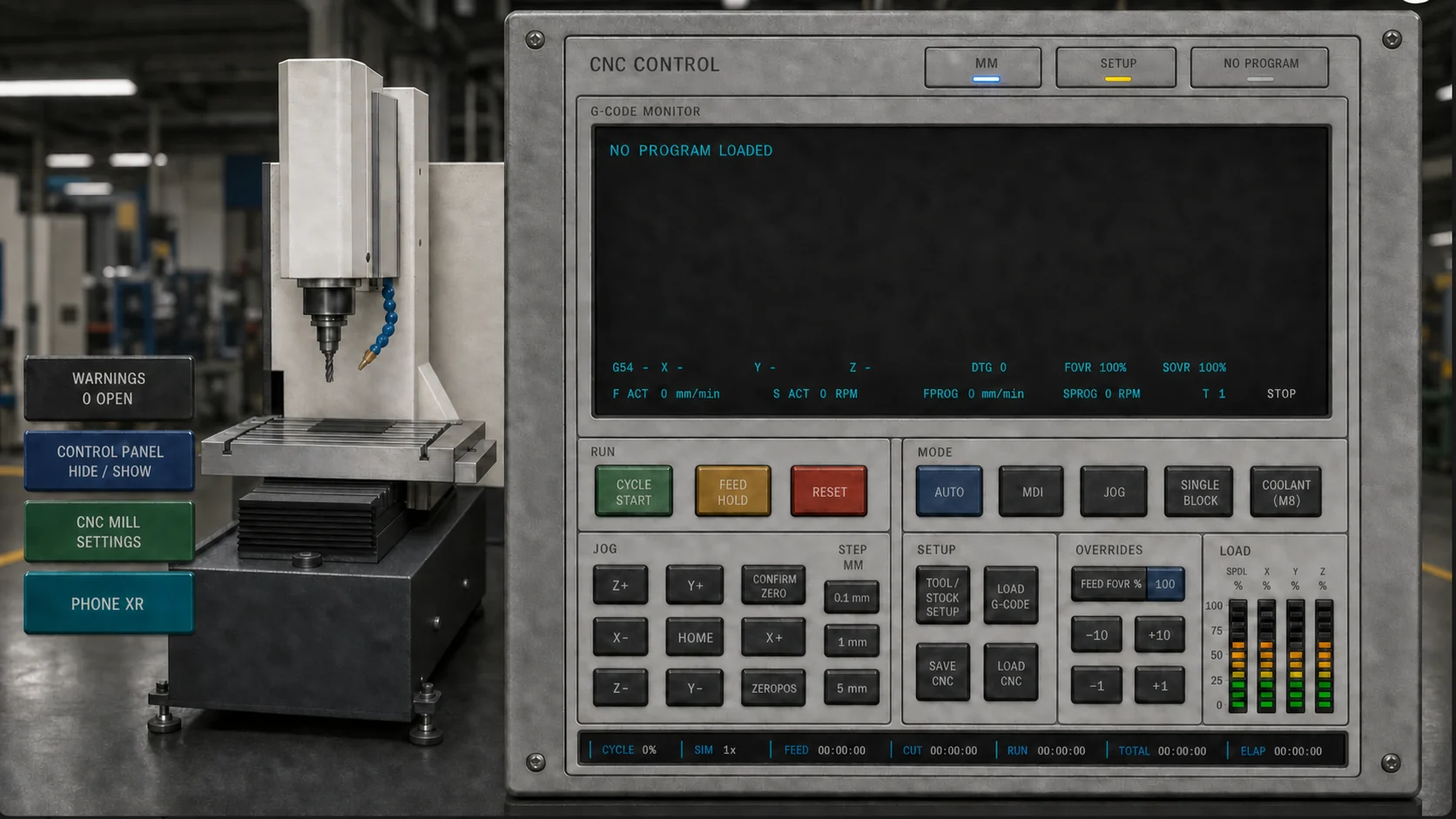
CNC Simulation

Machine kinematics

Table and stock movement in X/Y with tool movement in Z.

Visible material removal

Direct tool contact updates stock depth and color during machining.

FEED · RPM

Override

Programmed vs. actual feed

Displays FPROG and F ACT with the active unit system and feed override applied.

Programmed vs. actual spindle

Displays SPROG and S ACT in RPM with spindle override applied.

SPDL · XYZ

Loads

Spindle load

Estimates spindle load from calculated cutting power and torque.

Axis loads

Estimates X, Y and Z load percentages from motion, configured actuator profiles and cutting force.

TIME

Cycle timing

Shows cycle progress plus FEED, CUT, RUN and total/elapsed machining times.

CTRL

Controller behavior

Current G-code line, AUTO/MDI, Single Block, coolant, tool changes, sound and playback speed.

Adult learners using mixed reality beside a CNC mill
AR/XR · DIGITAL TWIN · G54

SAFETY INTELLIGENCE

Monitor safety throughout program execution

01

Stock and envelope: outside-stock cutting, stock mismatch and travel below stock thickness

02

Rapid motion: G0 below or too close to the stock surface

03

Cutting air: feed motion above the stock that may indicate an incorrect Z zero or program height

04

Plunge checks: vertical entry into material and verification of feed, spindle and coolant

05

Spindle: missing start or speed, no spindle command, machine-RPM limit and recommended RPM range

06

Feed and chip load: missing feed, high/low feed and high/low chip load

07

Coolant: no coolant command or coolant off while cutting a material that recommends it

08

Tool and material setup: missing pocket, diameter or length; invalid geometry or tool larger than stock; cutting length, stickout, reduced shank, holder clearance and holder collision; flute mismatch, conservative tool material, plastic heat and galling risk

09

Engagement and breakage: aggressive stepdown plus high or likely tool-breakage estimates

10

Runtime machine safety: axis/spindle load monitoring and non-continuable tool-tip collision with the table

PROGRAMMING & SETUP

Supported CNC program language

Work with an external G-code program or create and edit a program directly in MDI.

G0/G1G2/G3G20/G21G90/G91M3/M4/M5M8/M9F · S · T
01

Training materials

6061-T6 aluminum · 1018 mild steel · Acetal/POM · Custom

02

Tool library

HSS · Carbide · Coated carbide · Editable CSV library

03

Units and modes

Millimeters/inches · Absolute/incremental · Linear and I/J/K arcs

04

Machine configuration

Stock dimensions · Maximum spindle RPM · Standard/custom actuator and axis-load profiles · Save/load setup

05

Editable cost inputs

Material and tool prices · Reference tool life · Electricity · Coolant · Way oil · Pump and filter allocation

INSTRUCTOR EVIDENCE

Turn practice into measurable progress

The generated three-page PDF documents the CNC setup, simulated result, submission integrity and the editable direct manufacturing-cost estimate. The learner can also export the machined part as STL and a ZIP evidence package.

SESSION SCORE86
01

Page 1 · Submission

Student/course/assignment, program, date, Submission ID and verification status

02

Page 1 · CNC setup

Part preview, material, stock dimensions, G54, maximum RPM and tools used

03

Page 1 · Result

Simulation status, machining time, removed volume, stock percentage, target comparison status and Safety summary

04

Page 2 · Integrity

STL, G-code, session and manifest SHA-256 hashes; signature, verification URL and Safety events

05

Page 3 · Direct cost

Stock, tool life consumed, electricity, coolant, filter, way lubrication and estimated total

06

Page 3 · Operating basis

Program/cutting/coolant times, base/spindle/axis/pump energy and tool usage

READY TO EXPLORE?

Start with the FREE license

Your Mech CNC Mill FREE license lasts 14 days. One trial per user.

Activate FREE access Questions about institutional pilots
Verified instructors receive complimentary access.